AI agents in manufacturing and retail: ERP and Nebim V3 integration scenarios (with MCP)
A chatbot answers a question; an agent finishes a job. The difference is not the model's intelligence but its access: an agent is useful if it can read stock in the ERP, see the deviation in a store, prepare a transfer proposal, submit it for approval and write to the ERP once approved. When that access is set up badly, the result is either an assistant that can do nothing or the thing everyone fears — a model wired straight into the database.
This article explains how AI agents connect to the ERP — MCP (Model Context Protocol) connectors, the Nebim V3 example, the same approach for Logo and SAP — through scenarios from two industries: a retail chain running Nebim V3 and a manufacturing plant managed through Excel and WhatsApp. It also covers when write permission is granted, where human approval sits and how a pilot is measured.
What is an agent, and how is it different from a chatbot?
Technically, an agent is a software component with a goal that can call tools, decide between steps and measure the result. In Zzeti, expert agents carry domain knowledge and worker agents execute tasks; skills, goals and personas define behaviour; the workflow designer builds the conditional logic. An agent can talk to the user from the console, over WhatsApp or by voice — but its real work happens in the background, with data.
The four-step loop is the same in every industry: detect (find the deviation), diagnose (find the cause), act (prepare the proposal and assign it to an owner), measure (track the outcome). The first two steps need read access, the third needs human approval and the fourth needs observability.
- Chatbot: question → answer. Agent: goal → tool calls → action → measurement.
- Expert agents carry domain knowledge; worker agents execute; workflows hold the conditional logic.
- The loop: detect → diagnose → act → measure.
MCP: the standard through which an agent reaches the ERP
MCP (Model Context Protocol) is the open protocol through which a model or agent calls tools and data sources in external systems under a standard contract. Each connector is exposed as named functions with schemas: “get stock by store”, “summarize the last 30 days of sales”, “create a transfer order”. The agent writes no SQL and opens no database connection; it calls only the permitted functions, within the permitted scope.
For Nebim V3 this means reaching sales, stock, CRM, loyalty and production data through a native connector; for Logo, SAP or custom software the same approach applies with additional connectors — agents and scenarios do not change. Every call is scoped by role, logged with its trace, and the integration proxy decides which outbound connections exist at all.
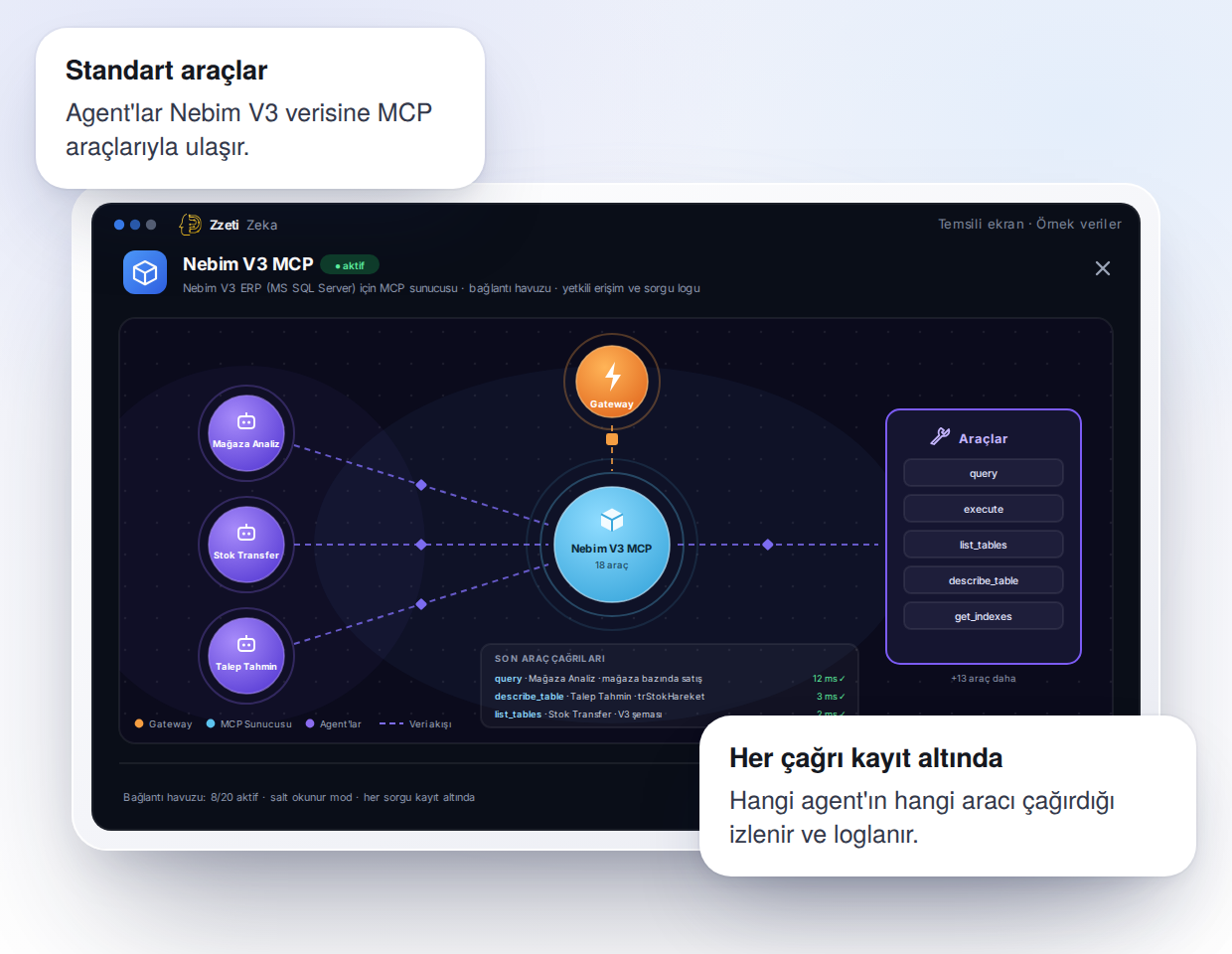
- Connector = named functions + schema; the agent writes no SQL and opens no database connection.
- Nebim V3: native connector (sales, stock, CRM, loyalty, production). Logo, SAP, custom systems: additional connectors, same agents.
- Scope: the role hierarchy (Store → Region → HQ) applies to every call.
- Development: testing in the MCP Inspector, new functions in the Functions IDE, verification before publishing.
- Record: every call in the audit log with its trace, parameters and result.
Retail scenario: the product that ran out in the store and the stock sitting in the warehouse
The classic retail leak: a size breaks in one store and loses sales while the same item waits in another store or in the warehouse. Every morning the agent reads stock and sales velocity by store and size through the Nebim V3 connector, detects the size breaks, diagnoses the cause (late shipment, phantom inventory, wrong allocation) and prepares a transfer proposal.
The proposal lands in the Actions Inbox of the responsible regional manager; once approved, the agent writes the transfer order to the ERP, the store manager is informed over WhatsApp and the agent tracks sales over the following days to measure the effect. A store manager sees only their store, a regional manager their region, HQ everything — the same agent, a different scope.
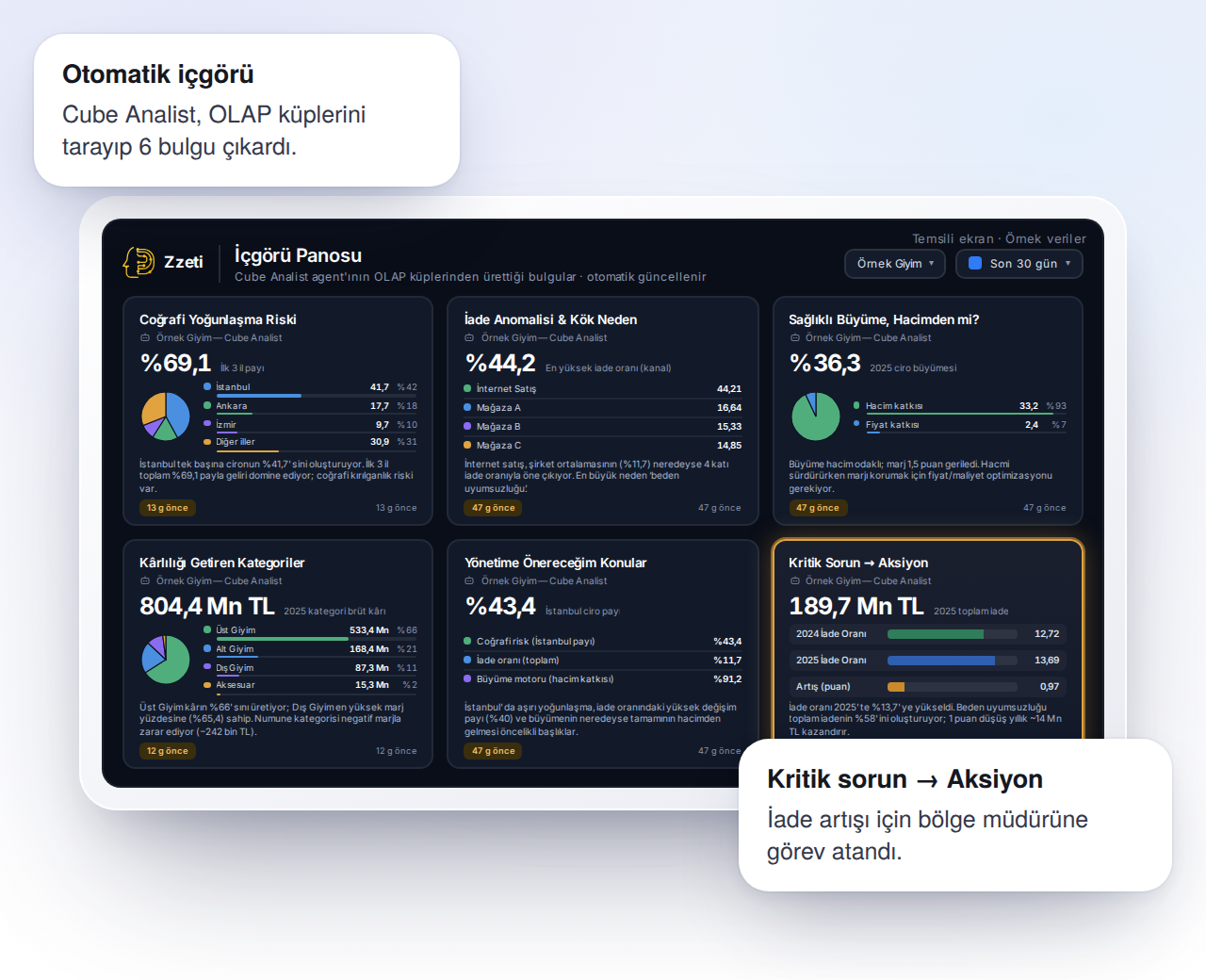
- Detect: size breaks and sales velocity by store (Nebim V3 read).
- Diagnose: shipment, phantom inventory or allocation error — the agent shows its reasoning.
- Act: transfer proposal → approval in the Actions Inbox → write to the ERP.
- Measure: sales and break rate after the transfer, tracked on a Board.
- Same pattern: pricing and markdowns, purchase planning, customer offers.
Manufacturing scenario: the plant managed through Excel and WhatsApp
In manufacturing SMEs the picture is mostly the same: there is either no ERP or it is used only in accounting; work orders live in Excel and information from the shop floor arrives on WhatsApp. That does not mean an agent cannot work — it means the data source is different. Connectors turn Excel files, photos and messages from WhatsApp and, where present, the accounting software into structured data; RAG collections hold the technical drawings and recipes.
Two scenarios stand out. The quotation agent combines the customer's drawing and quantity with similar past jobs, material and labour data to draft a quote, which the sales manager approves. The maintenance agent generates reminders for presses, furnaces and moulds from running hours and failure history, sends them to the foreman over WhatsApp and collects the done confirmation. Data stays inside the plant; the installation is air-gapped if required.
- Data sources: Excel, WhatsApp messages and photos, accounting software → structured data through connectors.
- Quotation agent: drawing + quantity + past jobs → draft quote → approval.
- Maintenance agent: running hours + failure history → reminder → WhatsApp → confirmation.
- Knowledge base: technical drawings, recipes and quality instructions in a RAG collection.
- If an ERP arrives later, the agents do not change; only a connector is added.
Write permission: when does an agent write to the ERP?
The most common mistake is to give the agent write access on day one — or never. The right order has three stages: read-only first (the agent detects, diagnoses and proposes), then approved writes (the proposal is approved in the Actions Inbox, the agent writes), and finally automatic writes within defined limits (transfers below a certain amount, say). At each stage, which function may be called by which role is defined in the connector.
Two technical rules apply to writes: every write must be idempotent — processing the same proposal twice must not create two transfers — and every write must be recorded with its trace: who approved, with which parameters, when.
- Stage 1 — read-only: detect, diagnose, propose.
- Stage 2 — approved writes: human approval in the Actions Inbox, then write to the ERP.
- Stage 3 — limited automatic writes: below defined thresholds, with an audit record.
- Rules: idempotent writes, role-based function permissions, a full trace.
Measuring the pilot: before and after
An integration working technically does not make the pilot a success; the yardstick is the leak the agent closes. Before the pilot starts, a single scenario is chosen and its metric defined: break rate, quote preparation time, number of unplanned stops. A typical four-week pilot covers connectivity and data quality in week one, read-only detections in week two, approved actions in week three and measurement in week four.
What you have at the end of the pilot is not a demo but an effect measured on your own data and a scenario in production. That is what a fixed-scope project means: scope, deliverable and metric are written down at the start, and when the project ends, the platform and the scenario belong to the organization.
- Week 1: connector set-up, role scope, data-quality checks.
- Week 2: read-only detection and diagnosis; the agent's reasoning is reviewed.
- Week 3: approved actions through the Actions Inbox.
- Week 4: before/after measurement; decision on the second scenario.
What makes an AI agent useful is not the size of the model but governed access to the ERP: reads through MCP connectors, approved writes through the Actions Inbox, role-based scope and a trace for every call. The pattern is the same in a chain running Nebim V3 and in a plant managed through Excel and WhatsApp — detect, diagnose, act, measure — and the pilot ends with a single scenario measured on the organization's own data.
Frequently asked questions
Does the agent connect directly to the ERP database?
No. The agent calls only the functions defined in the MCP connector, within the scope its role allows. It writes no SQL and opens no database connection; every call is logged with its trace and the integration proxy controls outbound connections.
We use an ERP other than Nebim V3 — do the same scenarios work?
Yes. An additional MCP connector is set up for Logo, SAP or custom software; the agents, scenarios and approval flow stay the same. What is special about Nebim V3 is that the native connector is ready.
Can an agent be deployed in a plant with no ERP that runs on Excel?
Yes. Connectors turn Excel files, WhatsApp messages and the accounting software into structured data; the quotation, maintenance and knowledge-base scenarios run on that data. If an ERP arrives later, only a connector is added.
Where does human control sit?
In the Actions Inbox: every write the agent proposes is approved by the defined role; limited automatic writes happen only below thresholds the organization sets, with an audit record. Guardrails enforce input and output policies; the role hierarchy enforces access scope.
The same architecture, installed as a fixed-scope project
Zzeti Zeka brings the gateway, RAG, MCP connectors, agents and observability ready-made; Skyloop installs it on your infrastructure — on-premise, air-gapped or private cloud — with the scope and the metric defined up front, not as hourly consulting.